TRS-80 DOS - VTOS (Virtual Technology's Operating System)
Page Index
Background
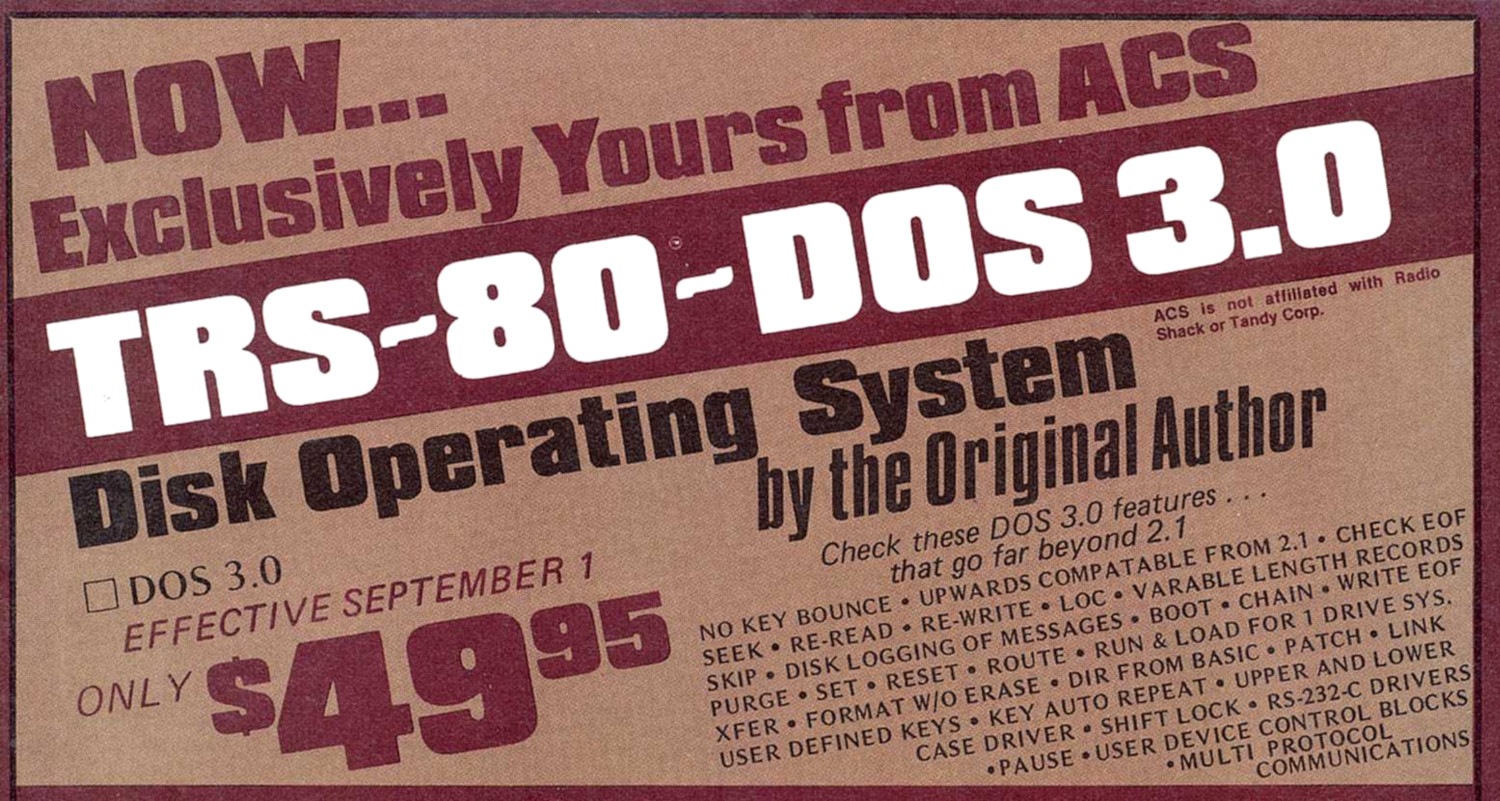
Early Advertisement
VTOS (Virtual Technology's Operating System) was a TRS-80 Model I disk operating system written by Randy Cook, the original author of Model I TRSDOS versions 2.0 and 2.1. After parting ways with Tandy/Radio Shack over disputes regarding copyright ownership, royalties, and control of the source code, Cook formed his own company, Virtual Technology Inc. (based in Richardson, Texas), and continued development of his operating system independently.
Cook's agreement with Radio Shack allowed him to maintain ownership of the code he had written for TRSDOS. He used this original source code as the basis for VTOS, fixing the bugs that had plagued TRSDOS 2.1 and adding the features he had originally intended to include. Early advertisements sometimes referred to it as "TRS-80 DOS 3.0 Disk Operating System by the Original Author" before the VTOS name was consistently adopted.
There were no VTOS 1.0 or 2.0 releases. The version numbering started at 3.0 because Cook positioned VTOS as a direct continuation of TRSDOS 2.1 rather than a new product. VTOS was developed only for the Model I; there was never a Model III version.
VTOS was well-liked by many who used it. The advertisements boasted an endorsement by Lance Micklus and the "Scott Adams Seal of Approval." However, VTOS is remembered today primarily for two things: it was the only copy-protected TRS-80 operating system, and it was the direct ancestor of LDOS.
VTOS 3.0
(Randolph-H-Cook).jpg)
v3.0 Disk
(Randolph-H-Cook)[M1].gif)
v3.0 Bootup Screen
(Randolph-H-Cook)[M1].gif)
v3.0.1 Bootup Screen
VTOS 3.0 was the first commercial release from Virtual Technology, appearing in 1979 at a price of $49.95. It was marketed primarily as a bug-free, fully realized replacement for TRSDOS 2.1, fixing the infamous granule allocation flaws that destroyed files, the HIMEM bugs, and the unreliable keyboard debouncing that had plagued Tandy's official DOS. Like TRSDOS, it could only support single density. It came with a mimeographed manual.
VTOS 3.0 was designed to be compatible with software written for TRSDOS 2.1, ensuring users could transition without losing access to their existing programs. It used the same TRSDOS-style disk layout and directory structure: drives numbered :0 through :3, 8-character filenames with 3-character extensions, and slash separators.
While an improvement over TRSDOS 2.1, VTOS 3.0 had its own share of bugs and was hampered by aggressive copy protection that frustrated users. As Harv Pennington noted in TRS-80 Disk and Other Mysteries: This system has some nice features but is, in my opinion, VERY AGGRAVATING to use because of its “BACKUP” protection feature. In the version that I used for evaluation, some of the commands did not work entirely as advertised.
Versioning and Maintenance Releases
- Maintenance Release 2 was released around April of 1980 and offered a patch to SYS0/SYS:
PATCH SYS0/SYS.RVEJARAJ for X'4744' = 00
- Maintenance Release 3 was released around May of 1980 and offered a patch to SYS0/SYS:
PATCH SYS0/SYS.RVEJARAJ for X'4864' = CD F0 4A
X'4AF0' = DD 71 08 DD 75 0C DD 74 0D C9 - VTOS v3.1 was announced around May of 1980 saying:
VTOS 3.1 contains modifications to the FORMAT, BACKUP, and CHAIN utilities that provide better service for single drive users and improvements to the PATCH utility. New MEMORY and ALLOC commands yield faster memory and disk resource management.
Combined with these are keyboard and printer speed buffers which enable you to typeahead of the system without missing keystrokes.
The VTOS 3.1 Reference Manual contains the detailed functioning of each command and also provides an insight into the theory of operation.
The VTOS 3.1 System Kernel contains all of the file maintenance facilities required by an assembly language program without operating system utilities. The VTOS 3.1 System Kernel is available to software vendors, under a license agreement, to be used as the distribution media for the vendor’s own software.
DMK Images
- VTOS v3.0.0 Set - Duplicator/Master/System/Data - Created by Tim Mann
- VTOS v3.0.1 Set - Duplicator/Master/System/Data - Created by Tim Mann
Manuals
Types of Disks
Master Disks
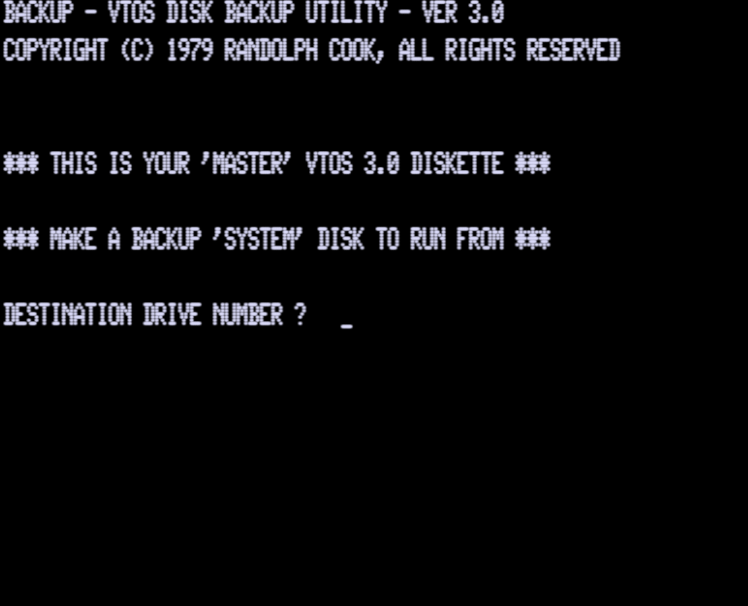
Purchasing VTOS 3.0 gave you one "master" disk. A master disk can make additional system disks to boot VTOS from, but a system disk cannot create more system disks.
The master disk has to be left non-write-protected during this process, because the software increments a "number of system disks" made counter on the master disk and writes it back. You get a "destination disk write protected" error if the master disk is write protected, even though of course it is the source disk for the copying process. The counter is in the short sector 0x7e.
In place of the normal 256-byte track 0 sector 4, a VTOS *master* disk has three short sectors, numbered 0x7c, 0x7d, and 0x7e. Sectors 0x7c and 0x7d have only 1 byte of data following the DAM, no CRC, and then only 8 gap bytes. Sector 0x7e is fully valid as a 16-byte non-IBM sector, containing the VTOS version in ASCII and some data trackers.
Sector 7C (Sector is identical for MASTER, SYSTEM, and DATA disk types)
| Sector Data | Notes |
|---|---|
| FE 00 00 7C 01 BC E7 | Valid sector header
|
| FF FF FF FF FF FF FF FF FF FF FF FF 00 00 00 00 00 00 | Valid post-header GAP2, 18 bytes (roughly standard size 11 ff + 6 00) |
| FB E5 | DAM followed by only one data byte instead of 16, and no 2-byte data CRC |
| FF FF FF FF 00 00 00 00 | Short post-data GAP3, 8 bytes (very small, standard is maybe 27 ff + 6 00) |
Sector 7D
| Sector Data | Notes |
|---|---|
| FE 00 00 7D 01 8F D6 | Valid sector header
|
| FF FF FF FF FF FF FF FF FF FF FF FF 00 00 00 00 00 00 | Valid post-header GAP2 |
| FB E5 | DAM followed by only one data byte instead of 16, and no 2-byte data CRC |
| FF FF FF FF 00 00 00 00 | Short post-data GAP3 |
Sector 7E
| Sector Data | Notes |
|---|---|
| FE 00 00 7E 01 DA 85 | Valid sector header
|
| FF FF FF FF FF FF FF FF FF FF FF 00 00 00 00 00 00 | Post-header gap2 bytes (as above) |
| FB 56 54 4F 53 3A 33 2E 30 0A 00 31 00 08 00 D0 07 54 C9 V T O S : 3 . 0 |
|
| FF 80 FF FF FF FF FF FF FF FF F8 00 00 00 00 00 00 | Post-data GAP3 bytes. Not all ff to start because this sector was written after being formatted, so there is some noise where the write stopped and a resync where the ff's change to 00's |
Sector 7F
| Sector Data | Notes |
|---|---|
| FB 56 54 4F 53 3A 33 2E 30 30 38 2F 31 38 2F 37 39 V T O S : 3 . 0 0 8 / 1 8 / 7 9 | DAM but with no preceding header, followed by some data bytes. Tim thinks this was formatted as another non-IBM(?) sector 0x7F, but then its header was overwritten by gap bytes when sector 0x7e was written to (XXX can probably confirm this with analysis of FORMAT program, duplicator disk, etc. -- TBD) |
| E5 E5 E5 ... E5 E5 13 8D FF FF FF ... FF 00 00 00 ... 00 | Following the above, there is a long sequence of e5 bytes (this pattern was typically used for the data bytes of a sector during formatting). The "..." is all e5 bytes. I didn't count how many. See system disk analysis. |
System Disks
On a system disk, mini-sector 0x7c still has only 1 byte of data following the DAM, no CRC, and then only 8 gap bytes. But sector 0x7d is fully valid as a 16-byte non-IBM sector, containing a copy of the counter data in the master's 16-byte sector when this system disk was made. (The master's counter is incremented first, so the system disk gets the new value.) Sector 0x7e has had its header overwritten. Sector 0x7F's header exists but its data area is missing its CRC (details below).
Sector 7C (Sector is identical for MASTER, SYSTEM, and DATA disk types)
Sector 7D (Differs from MASTER in that it has 16 bytes of real data with a valid CRC)
| Sector Data | Notes |
|---|---|
| FE 00 00 7D 01 8F D6 | Valid sector header
|
| FF FF FF FF FF FF FF FF FF FF FF FF 00 00 00 00 00 00 | Valid post-header GAP2 |
| FB 56 54 4F 53 3A 33 2E 30 0A 00 31 00 08 00 D0 07 54 C9 V T O S : 3 . 0 |
|
| FF FF FF FF FF FF FF FF FF FF FF 00 00 00 00 00 00 | Post-data GAP3 |
Sector 7E
| Sector Data | Notes |
|---|---|
| FB E5 | DAM without a preceding header. This was originally sector 0x7e, but the header was overwritten by writing a full 16-byte non-IBM sector 0x7d. This DAM has only one byte of data following and no CRC |
| FF FF FF FF 00 00 00 00 | Short post-data GAP3 |
Sector 7F
| Sector Data | Notes |
|---|---|
| FE 00 00 7F 01 E9 B4 | Valid sector header
|
| FF FF FF FF FF FF FF FF FF FF FF FF 00 00 00 00 00 00 | Valid post-header GAP2 |
| FB 56 54 4F 53 3A 33 2E 30 30 31 2F 30 31 2F 39 39 V T O S : 3 . 0 0 1 / 0 1 / 9 9 | DAM followed by the standard good data bytes with the data 1/1/99 which was typed in when the backup asked for a date. NOTE:There is no CRC here, as there should be if this were a valid non-IBM 16-byte sector. The remainder of the sector is junk |
There is no CRC here, as there should be if this were a valid non-IBM 16-byte sector.
Afterwards is junk, "e5 e5 e5 ... e5 ee 02 ff ff ff ... ff 00 00 00 ... 00" - a lot of e5 bytes followed by what could be a CRC (ee 02 here) and gap4. There aren't nearly enough e5 bytes to make an IBM 256-byte sector. It's evident (confirmed later) that this sector 0x7F was formatted containing the 16 bytes of data shown, without a valid CRC, and was subsequently written to as either IBM or non-IBM. Everything after the "VTOS:3.001/01/99" is essentially junk, leftover data that (on other tracks) would have been the later part of the formatting pattern for a normal IBM sector 4.
Data disks
How do data disks differ from system disks with regard to the copy-protection scheme? Tim gather system disks can format data disks but can't be backed up to a data disk, only to another system disk.
Apparently data disks get the unmodified funky format -- none of the mini-sectors are written to. The only non-IBM access seen when booting a system disk and formatting a data disk was:
debug: non-IBM read: drv 0x00, sid 0, trk 0x00, sec 0x7d
This must have been from SYS0 checking the disk type at boot time, similar to what we see as the first read when booting a master or duplicator disk; the difference is that it succeeds without error for a system disk, so sector 0x7F is never read.
Nothing is written back to the system disk when formatting a data disk; it doesn't change. The zeroed byte 14-15 remain 0000.
The data disk winds up with its name and date in sector 0x7F, but without a valid CRC, as we've seen on other disk types.
As for the disk sectors ....
The data disk sector 4 is set up identical to the format of the MASTER DISK except for the payload sector 7F which simply contains the disk name and date instead of any encoded or tracking data.
Sector 7C (Sector is identical for MASTER, SYSTEM, and DATA disk types)
Sector 7D (Identical to MASTER DISK)
| Sector Data | Notes |
|---|---|
| FE 00 00 7D 01 8F D6 | Valid sector header
|
| FF FF FF FF FF FF FF FF FF FF FF FF 00 00 00 00 00 00 | Valid post-header GAP2 |
| FB E5 | DAM followed by only one data byte instead of 16, and no 2-byte data CRC |
| FF FF FF FF 00 00 00 00 | Short post-data GAP3 |
Sector 7E (Identical to MASTER DISK 7D)
| Sector Data | Notes |
|---|---|
| FE 00 00 7E 01 DA 85 | Valid sector header
|
| FF FF FF FF FF FF FF FF FF FF FF FF 00 00 00 00 00 00 | Valid post-header GAP2 |
| FB E5 | DAM followed by only one data byte instead of 16, and no 2-byte data CRC |
| FF FF FF FF 00 00 00 00 | Short post-data GAP3 |
Sector 7F (Similar to the SYSTEM DISK 7F except for the payload code)
| Sector Data | Notes |
|---|---|
| FE 00 00 7F 01 E9 B4 | Valid sector header
|
| FF FF FF FF FF FF FF FF FF FF FF FF 00 00 00 00 00 00 | Valid post-header GAP2 |
| FB 50 41 53 53 57 4F 52 44 30 31 2F 30 31 2F 38 30 [ D I S K N A M E ] [D I S K D A T E] [CRC] | DAM followed by DISK NAME and then DISK DATE in ASCII. There is no valid CRC here. |
| E5 E5 ... |
Duplicator Disks
Learning about Duplicator Disks
In 1979 or so Tim was surprised to discover that VTOS 3.0 master and system disks still contain all the code to be duplicator disks that mass-produce master disks. (I don't know what Randy Cook's own name for this type of disk was, but I'll call it a duplicator disk here.) Booting a VTOS 3.0 duplicator disk starts scanning for blank media in all drives and will create a master disk whenever a fresh blank disk is inserted. The only difference between these disks and master or system disks is in the mini-sectors.
In 2026, while working to relearn about VTOS 3.0 copy protection, Tim found an old directory of VTOS 3.0 disk images from 1998 and 2001 on his computer, evidently from when he was working on getting VTOS 3.0 to work in xtrs. Tim hadn't kept any notes in that directory; it only has several .jv3 images (most from 1998) and a couple of .dmk images (from 2001) with suggestive names.
There is a "vtosdup.dsk" in jv3 format in the directory, and in fact it works as a duplicator even with 2026's xtrs, but Tim got a "Disk worn out" error sometimes. Later Tim learned this error occurs if you make too many masters with a duplicator; a feature Tim didn't understand until the 2026 project.
There is no vtosdup.dmk present. It seems Tim didn't make a .dmk format duplicator in 2001.
Key disk operations performed by duplicator
Part of the 2026 project was to study what operations VTOS 3.0 does on the mini-sectors (including initial formatting) and disassemble some of the nearby code to see what is going on, what the data in the mini-sectors means, etc.
This section discusses the non-IBM reads and writes that are done by the duplicator, plus the write-track operations done during formatting. It shows the duplicator booting, making one master, then looping back to look for more fresh media.
The messages are summarized from a much longer file of xtrs debug message output that Tim didn't keep. This output comes from giving the command "diskdebug" to xtrs's built in-debugger to turn on logging for some combination of combination of: 1=FDC register I/O, 2=FDC commands, and 4=VTOS 3.0 JV3 kludges.
(Note: Tim did this experiment originally with a copy of my old "vtosdup.dsk" fake duplicator from 1998. Later Tim tweaked the output a bit in places where it would have otherwise shown minor details that don't match what a real duplicator disk shows.)
	debug: non-IBM read: drv 0x00, sid 0, trk 0x00, sec 0x7d
	debug: non-IBM read: drv 0x00, sid 0, trk 0x00, sec 0x7F
	debug: non-IBM read: drv 0x00, sid 0, trk 0x00, sec 0x7F
	debug: non-IBM read: drv 0x00, sid 0, trk 0x00, sec 0x7e
	debug: non-IBM read: drv 0x00, sid 0, trk 0x00, sec 0x7d
	debug: non-IBM read: drv 0x00, sid 0, trk 0x00, sec 0x7c
	debug: writetrk 0xf4 drv 1 sid 0 ptk 0 tk 0 sden
	debug: writetrk 0xf4 drv 1 sid 0 ptk 1 tk 1 sden
	debug: writetrk 0xf4 drv 1 sid 0 ptk 2 tk 2 sden
	debug: writetrk 0xf4 drv 1 sid 0 ptk 3 tk 3 sden
	debug: writetrk 0xf4 drv 1 sid 0 ptk 4 tk 4 sden
	debug: writetrk 0xf4 drv 1 sid 0 ptk 5 tk 5 sden
	debug: writetrk 0xf4 drv 1 sid 0 ptk 6 tk 6 sden
	debug: writetrk 0xf4 drv 1 sid 0 ptk 7 tk 7 sden
	debug: writetrk 0xf4 drv 1 sid 0 ptk 8 tk 8 sden
	debug: writetrk 0xf4 drv 1 sid 0 ptk 9 tk 9 sden
	debug: writetrk 0xf4 drv 1 sid 0 ptk 10 tk 10 sden
	debug: writetrk 0xf4 drv 1 sid 0 ptk 11 tk 11 sden
	debug: writetrk 0xf4 drv 1 sid 0 ptk 12 tk 12 sden
	debug: writetrk 0xf4 drv 1 sid 0 ptk 13 tk 13 sden
	debug: writetrk 0xf4 drv 1 sid 0 ptk 14 tk 14 sden
	debug: writetrk 0xf4 drv 1 sid 0 ptk 15 tk 15 sden
	debug: writetrk 0xf4 drv 1 sid 0 ptk 16 tk 16 sden
	debug: writetrk 0xf4 drv 1 sid 0 ptk 17 tk 17 sden
	debug: writetrk 0xf4 drv 1 sid 0 ptk 18 tk 18 sden
	debug: writetrk 0xf4 drv 1 sid 0 ptk 19 tk 19 sden
	debug: writetrk 0xf4 drv 1 sid 0 ptk 20 tk 20 sden
	debug: writetrk 0xf4 drv 1 sid 0 ptk 21 tk 21 sden
	debug: writetrk 0xf4 drv 1 sid 0 ptk 22 tk 22 sden
	debug: writetrk 0xf4 drv 1 sid 0 ptk 23 tk 23 sden
	debug: writetrk 0xf4 drv 1 sid 0 ptk 24 tk 24 sden
	debug: writetrk 0xf4 drv 1 sid 0 ptk 25 tk 25 sden
	debug: writetrk 0xf4 drv 1 sid 0 ptk 26 tk 26 sden
	debug: writetrk 0xf4 drv 1 sid 0 ptk 27 tk 27 sden
	debug: writetrk 0xf4 drv 1 sid 0 ptk 28 tk 28 sden
	debug: writetrk 0xf4 drv 1 sid 0 ptk 29 tk 29 sden
	debug: writetrk 0xf4 drv 1 sid 0 ptk 30 tk 30 sden
	debug: writetrk 0xf4 drv 1 sid 0 ptk 31 tk 31 sden
	debug: writetrk 0xf4 drv 1 sid 0 ptk 32 tk 32 sden
	debug: writetrk 0xf4 drv 1 sid 0 ptk 33 tk 33 sden
	debug: writetrk 0xf4 drv 1 sid 0 ptk 34 tk 34 sden
	debug: non-IBM write drv 0x01, sid 0, trk 0x00, sec 0x7e
	debug: non-IBM write drv 0x00, sid 0, trk 0x00, sec 0x7F
	debug: non-IBM read: drv 0x00, sid 0, trk 0x00, sec 0x7d
	debug: non-IBM read: drv 0x00, sid 0, trk 0x00, sec 0x7F
Tim also checked separately that all reads/writes to sectors 0x7c-0x7F were non-IBM.
Data read/written (edited down from debuglog + comments on final status)
First two reads (pc 0x45xx) are done by SYS0 to detect the disk type. 0x7d CRC error -> not a system disk; 0x7F okay -> apparently a duplicator.
non-IBM read: drv 0x00, sid 0, trk 0x00, sec 0x7d
status_read() => 0x08 pc 0x45a3 = FB DAM, CRC error

non-IBM read: drv 0x00, sid 0, trk 0x00, sec 0x7F
56 54 4f 53 3a 33 2e 30 03 00 0b 00 20 00 d0 07
status_read() => 0x00 pc 0x45a3 = FB DAM, no errors
Next read (pc 0x56xx area) of 0x7F is done by BACKUP to get the counter values from the duplicator.
non-IBM read: drv 0x00, sid 0, trk 0x00, sec 0x7F
56 54 4f 53 3a 33 2e 30 03 00 0b 00 20 00 d0 07
status_read() => 0x00 pc 0x5622 = FB DAM, no errors
Then BACKUP reads the other 3 mini-sectors, perhaps to double check the disk type. (I learned later that, as far as I've seen, backup always reads all four mini-sectors of the source disk, and also of the destination disk if it is already formatted.)
non-IBM read: drv 0x00, sid 0, trk 0x00, sec 0x7e
status_read() => 0x08 pc 0x5622 = FB DAM, CRC error

non-IBM read: drv 0x00, sid 0, trk 0x00, sec 0x7d
status_read() => 0x08 pc 0x5622 = FB DAM, CRC error

non-IBM read: drv 0x00, sid 0, trk 0x00, sec 0x7c
status_read() => 0x08 pc 0x5622 = FB DAM, CRC error
Formatting a VTOS v3.0 Disk
After booting as above, the BACKUP program on the duplicator disk transparently loads the FORMAT program to format the destination disk. Formatting a VTOS 3.0 disk always writes the four mini-sectors in the same way. Whether the disk becomes data, system, master, or duplicator depends on which (if any) of the mini-sectors are written to afterward. Here are more details about formatting.
Formatting writes a lot of data bytes, so I've kept the detailed trace output of that in separate files. As shown above in the trace that shows only disk commands without the data bytes, the 35 tracks are formatted once each, in order. Tim captured detailed data for track 0, track 1, and track 17. Obviously, track 0 is interesting because it has the mini-sectors. Track 1 is a typical ordinary track, useful for comparison. Track 17 is the directory track; Tim was curious if it is formatted intially with FA DAMs or only rewritten with FA DAMs later when it's populated with directory data.
With help from sed and tr, Tim edited down the debug log messages from debug log messages from FDC register I/O to a manageable size, showing only the input data to the write-track commands. Even that is too big to include in full here, so I'll just summarize it.
To fully understand these input patterns, you need to know that a WD1771 FDC write-track command writes most bytes given to it as ordinary data bytes, but a few are special. F7 generates two CRC bytes. F8-FB each restart a new CRC computation and generate a DAM byte with the appropriate missing clock bits. FC generates an IAM byte with missing clocks. FE restarts a new CRC computation and generates an IDAM byte with missing clocks. (Aside: The WD1791/3 FDC is generally similar, but has some different special bytes for double density.)
Much as Tim had guessed, the same basic formatting pattern is used for all tracks, but with special changes for track 0 and track 17. Track 1 has a typical vanilla pattern.
- The same on all tracks: The gap bytes at the start and end of each track. The initial gap is just a sequence of ff's followed by six 00's as a leadin to the IDAM.
ff ff ff ff ff ff ff ff ff ff ff ff ff ff 00 00 00 00 00 00
The final gap is just ff ff ... to the end of the medium. - Unique on each sector: The track number and sector number in the sector header, and of course the header CRC.
- A typical normal sector looks like the following, except Tim have cut down the 256 "e5" bytes to just "e5 e5 ... e5". This one is track 0, sector 0:
fe 00 00 00 01 f7 ff ff ff ff ff ff ff ff ff ff ff ff 00 00 00 00 00 00
fb e5 e5 ... e5 f7 ff ff ff ff ff ff ff ff ff ff ff ff 00 00 00 00 00 00 - Different only on track 17: The DAMs are all fa instead of fb. So the answer to the question Tim had earlier is that the special directory DAMs are established already when formatting the directory track.
- Different only on track 0: The pattern for the physically last sector on the track (normally sector 4) is partially overwritten, beginning at sector 4's header, with a pattern for the four mini-sectors.
Sectors 0x7c, 0x7d, and 0x7e are all what I've called "overly short", with too little space for data and gap:fe 00 00 7c 01 f7 ff ff ff ff ff ff ff ff ff ff ff ff 00 00 00 00 00 00
fb e5 ff ff ff ff 00 00 00 00
fe 00 00 7d 01 f7 ff ff ff ff ff ff ff ff ff ff ff ff 00 00 00 00 00 00
fb e5 ff ff ff ff 00 00 00 00
fe 00 00 7e 01 f7 ff ff ff ff ff ff ff ff ff ff ff ff 00 00 00 00 00 00
fb e5 ff ff ff ff 00 00 00 00 - Sector 0x7F is formatted with some ASCII data as its first 16 bytes following the fb DAM, right in the formatting pattern: "VTOS:3.005/12/79". (As already observed elsewhere, the date initially formatted into sector 0x7F is the creation date of the disk if BACKUP or FORMAT asked you to enter one. It usually does ask, but duplicator disks use a fixed date, matching the duplicator disk's own creation date.):
fe 00 00 7f 01 f7 ff ff ff ff ff ff ff ff ff ff ff ff 00 00 00 00 00 00
fb 56 54 4f 53 3a 33 2e 30 30 35 2f 31 32 2f 37 39 e5 e5 ...
There is NOT an f7 ("generate CRC" special byte) right after these 16 bytes as there normally would be after sector data. The overwrite sector 4 of the regular formatting pattern ends without adding an f7, so where there would normally be CRC bytes for the 16 data bytes, the pattern instead just has contant "e5 e5" data fill bytes left over from sector 4 of the regular pattern. There is an f7 later (again left over from normal sector 4) after the e5's end, but it's not in the right place to be a valid CRC for a 256 byte sector either. So reading this sector (if its header hasn't been overwritten by a write to sector 0x7e) will return 16 bytes of valid data but report a CRC error.
Final Step in Making a Master Disk
The next write after formatting stores modified counter values to the new master disk, by doing a 16-byte non-IBM write to sector 0x7e. Bytes 10-11 are the value read from the duplicator disk; bytes 12-13 are zeroed to serve as the master disk's system disk counter. The other 12 bytes are unchanged.
non-IBM write drv 0x01, sid 0, trk 0x00, sec 0x7e
56 54 4f 53 3a 33 2e 30 03 00 0c 00 00 00 d0 07
status_read() => 0x00 pc 0x54a5 = no errors
The next non-IBM write puts a modified counter value back to the duplicator disk, sector 0x7F. Bytes 10-11 have been incremented to serve as a master disk counter / part of the serial number. The other 14 bytes are unchanged.
non-IBM write drv 0x00, sid 0, trk 0x00, sec 0x7F
56 54 4f 53 3a 33 2e 30 03 00 0c 00 20 00 d0 07
status_read() => 0x00 pc 0x54a5 = no errors
The next two non operations (both reads) in my trace were the same as the first two, as the duplicator disk reboots automatically to go back to waiting for fresh media in other drives.
non-IBM read: drv 0x00, sid 0, trk 0x00, sec 0x7d
status_read() => 0x08 pc 0x45a3 = FB DAM, CRC error

non-IBM read: drv 0x00, sid 0, trk 0x00, sec 0x7F
56 54 4f 53 3a 33 2e 30 03 00 0c 00 20 00 d0 07
debug: status_read() => 0x00 pc 0x45a3 = FB DAM, no error
Final Step in Making a Duplicator Disk
At this point, it's evident that to create a duplicator disk instead of a master disk, one would basically just do a 16-byte non-IBM write to sector 0x7F, instead of to 0x7e as when creating a master. Of course, the exact bytes to write differ slightly since the four 16-bit fields don't all have the same meaning on a duplicator disk as on a master disk. The details of that are summarize at the end of this document.
Tim doesn't know how VTOS 3.0 duplicator disks were originally created; possibly some special software to create them. Tim didn't find any hidden code that would do that on VTOS 3.0 disks as shipped, though he didn't study and disassemble enough to be sure there isn't any.
Tim doesn't remember exactly how he created his 1998 fake duplicator. Tim had a good (but not perfect) idea of what a duplicator disk must look like and cobbled one together, probably in part by modifying a VTOS 3.0 master or system disk JV3 image with a hex editor.
Now in 2026 when Tims know more, he made a much cleaner duplicator in DMK format. He started with an image of a clean VTOS 3.0 disk that had been captured from a physical disk to DMK format, and used a hex editor to do the following:
- Recreating mini-sector 0x7e, repairing the damage the duplicator did to that sector's header when writing to sector 0x7d. This involved:
- Putting back 0x7d's original overly-short data and gap
- Putting back 0x7e's sector header.
- Editing the table that the DMK file has at the beginning of the track that gives pointers to all the IDAMs, adding a pointer to the IDAM for sector 0x7e in the proper order (between those for 0x7d and 0x7F).
- Overwriting the data area of sector 0x7F with desired initial values of the VTOS version string and the proper 8 bytes of counters / limits. Compute the correct CRC for this data and overwrite the bogus e5 e5 CRC bytes with the new correct values.
The resulting duplicator disk seems to work well! Of course there are ways to accomplish the same thing; for example, in theory one could use xtrs's built-in debugger to manipulate what VTOS 3.0 does when making a system disk from a master disk, forcing it to write (slightly different values) to sector 0x7F instead of 0x7e. That seemed harder to me than using a hex editor on the DMK file, so I didn't try it.
Making a System Disk
Using a master disk to make a system disk is quite similar to using a duplicator disk to make a master disk. The master disk boots into BACKUP but then (unlike a duplicator) prompts for destination drive, date, and password. It doesn't prompt for disk name; that stays VTOS:3.0.
Here are the non-IBM accesses Tim saw when making a system disk from a master disk and what they are for. Tim didn't pull out the data from the debuglog here, but Tim did look at it on the disk images before and after (see farther below).
- During boot, SYS0 determines the disk type of the source disk. To be a master, 0x7d should have a CRC error and 0x7F should be not found.
debug: non-IBM read: drv 0x00, sid 0, trk 0x00, sec 0x7d
debug: non-IBM read: drv 0x00, sid 0, trk 0x00, sec 0x7F - A bit later BACKUP checks again, but reads all four mini-sectors.
debug: non-IBM read: drv 0x00, sid 0, trk 0x00, sec 0x7F
debug: non-IBM read: drv 0x00, sid 0, trk 0x00, sec 0x7e
debug: non-IBM read: drv 0x00, sid 0, trk 0x00, sec 0x7d
debug: non-IBM read: drv 0x00, sid 0, trk 0x00, sec 0x7c - The data from 0x7e on the master is written to 0x7d on the system disk, with slight changes (see farther below from hexdiff'ing the disks).
debug: non-IBM write drv 0x01, sid 0, trk 0x00, sec 0x7d
- The data from 0x7e on the master is written back to 0x7e on the master, with the "system disks made" counter incremented (see farther below again).
debug: non-IBM write drv 0x00, sid 0, trk 0x00, sec 0x7e
A hexdiff of the master dmk with the new system dmk shows everything is the same except that the master dmk has 0x7e as the valid mini-sector with counters, while the system dmk has 0x7d as the valid mini-sector, with 0x7e's header smashed, as expected. Bytes 14-15 are zeroed out in the system dmk's counter area.
A hexdiff of a read-only copy of the master dmk saved from before the operation with the writable master dmk afterward shows the only ordinary data that changed was the counter value in bytes 12-13 of sector 0x7e. It was incremented by 1. In additon, of course, the crc bytes for that sector got updated to match.
Copy limits
BACKUP has code to limit the number of master disks that can be made from a given duplicator disk. The same or similar code limits the number of system disks that can be made from a given master.
For duplicator disks, the count of masters made is at offset 0xa in the 16-byte counter sector, and the limit is at offset 0xc. Since I don't have a real duplicator disk, Tim don't know what the original limit was.
When using a duplicator disk, the limit checking code looks as follows. The counter sector value is at address 5f00 on entry. The code is oddly written; maybe to try to obscure it, but it's not hard to understand what it does, just hard to understand why it does more operations than needed.
5d6a  26 5f        ld	h,5fh
5d6c  2e 00        ld	l,00h
5d6e  e5           push	hl
5d6f  45           ld	b,l
5d70  3e 0a        ld	a,0ah    ; offset of count
5d72  b7           or	a
5d73  28 1b        jr	z,5d90h
5d75  80           add	a,b
5d76  6f           ld	l,a      ; address of count to hl
5d77  5e           ld	e,(hl)   ; value of count to de
5d78  2c           inc	l
5d79  56           ld	d,(hl)
5d7a  13           inc	de       ; increment count
5d7b  3e 0c        ld	a,0ch    ; offset of limit
5d7d  b7           or	a
5d7e  28 0d        jr	z,5d8dh
5d80  e5           push	hl
5d81  80           add	a,b
5d82  6f           ld	l,a      ; address of count to hl
5d83  4e           ld	c,(hl)   ; value of count to hl
5d84  2c           inc	l
5d85  66           ld	h,(hl)
5d86  69           ld	l,c
5d87  af           xor	a
5d88  ed 52        sbc	hl,de    ; compute limit - count
5d8a  38 40        jr	c,5dcch  ; jump if over limit
Some non-IBM read/write code details
There's some oddly written code in this area of SYS0, maybe for obfuscation purposes. Disassemblies shown below are mostly "just in time", sometimes perhaps after prior runtime code modification.
It seems SYS0's FDC driver uses the same loop to do sector reads, writes, and verifies. A sector verify is like a sector read but doesn't save the data anywhere; it is done just to see what the error status is. Two key instructions in the loop are patched in memory to determine which operation is done.
; On a read they are:
45A8  1A           ld	a,(de)
45a9  02           ld	(bc),a
; On a verify they are:
45A8  1A           ld	a,(de)
45a9  00           nop
; On a write they would be (not checked):
45A8  ??           ld	a,(bc)
45a9  ??           ld	(de),a
When the operation is finished, the final FDC status is read at 4faf and munged into a return value.
45af  7e           ld	a,(hl)
45b0  e6 7c        and	7ch             ; mask off BUSY and DRQ
45b2  e1           pop	hl
45b3  d1           pop	de
45b4  c1           pop	bc
45b5  28 27        jr	z,45deh         ; done if no status bits set (returns 0)
45b7  fe 20        cp	20h
45b9  28 19        jr	z,45d4h         ; almost done if only FA bit is set
45bb  cb 57        bit	2,a
45bd  20 c8        jr	nz,4587h        ; go if LOSTDATA -- uncounted retry
45bf  cb 67        bit	4,a
45c1  28 0f        jr	z,45d2h         ; go if header was found (NOTFOUND=0)
45c3  f5           push	af              ; header was not found
45c4  3e ff        ld	a,ffh           ;
45c6  32 08 43     ld	(4308h),a       ; set current phys track to unknown(?)
45c9  cd 04 45     call	4504h           ; restore(?)
45cc  3e 0b        ld	a,0bh           ;
45ce  cd 53 45     call	4553h           ; seek(?)
45d1  f1           pop	af              ;
45d2  10 b3        djnz	4587h           ; dec retry counter and retry if nonzero
                                        ; no more retries available
45d4  47           ld	b,a             ; b = FDC status
45d5  3e fb        ld	a,fbh           ; a = potential error code fb
45d7  cb 08        rrc	b               ; loop start: check low bit of b
45d9  38 03        jr	c,45deh         ; return a as error code if set
45db  3c           inc	a               ; inc to next potential error code
45dc  18 f9        jr	45d7h           ; loop back
45de  c1           pop	bc
45df  c9           ret
; return values:
; 00 = no error
; fb = BUSY bit set (impossible unless some other code path joins)
; fc = DRQ bit set (impossible unless some other code path joins)
; fd = LOSTDATA bit set (impossible due to uncounted retries)
; fe = CRCERR bit set
; ff = NOTFOUND bit set
; 00 again = FA bit set
; 01 = F9 bit set
; 02 = NOTREADY bit set
Tim wonders if the starting error status value was specially patched to 0xfb instead of 1 here. The code above looks similar to what Tim remembers generating the standard TRSDOS/VTOS/LDOS error codes, but those have 1 and 2 used for header errors, 3 for lost data, 4 for parity (i.e., CRC) error, etc.
A) Boot time, after SYS0 is loaded and starts:
Very strange code sequence. Here are some fragments of a trace (not a static disassembly). The boot sector is loaded by ROM into 4200-42ff. The boot sector loads SYS0/sys and jumps indirect from 4274 to SYS0's entry point 4e00.
...
4274  e9           jp	(hl)
4e00  f3           di
4e01  ed 56        im	1
...
Interrupt.
...
4e85  32 0f 43     ld	(430fh),a
4e88  fb           ei
4e89  21 e4 4e     ld	hl,4ee4h
0038  c3 12 40     jp	4012h
4012  c3 18 46     jp	4618h
4618  e5           push	hl
...
Note how we get an interrupt (taking us to 0038) after the instruction following ei. (Delaying the interrupt by one instruction beyond where interrupts are enabled is a Z-80 feature primarily to keep the stack from growing too much when there are lots of interrupts; it ensures the sequence "ei; ret" at the end of an interrupt handler executes the "ret" and thus pops the stack before the next interrupt can occur. x86 has this too.)
SYS0's main interrupt handler starts at 4618. It runs a lot of code that Tim analyzed some version of (maybe TRSDOS 2.x) back in the late 1970's, but Tim don't remember much now. It's pretty confusing.
...
4697  5e           ld	e,(hl)
4698  23           inc	hl
4699  56           ld	d,(hl)
469a  eb           ex	de,hl
469b  e9           jp	(hl)     ; maybe a jump to the timer interrupt handler
432d  3e 08        ld	a,08h
432f  cd 13 44     call	4413h
4413  c3 a1 46     jp	46a1h
46a1  11 b1 46     ld	de,46b1h
46a4  fe 0c        cp	0ch
46a6  d0           ret	nc
46a7  07           rlca
46a8  6f           ld	l,a
46a9  26 46        ld	h,46h
46ab  f3           di
46ac  73           ld	(hl),e
46ad  2c           inc	l
46ae  72           ld	(hl),d
46af  fb           ei
46b0  c9           ret          ; maybe entry to a background task
Stopped at 4332
The above RET somehow takes us to the non-IBM sector checking code discussed just below. Tim thinks most of the above might be code that's not intentionally obfuscated, just clever and confusing. Oddly, it enters the background task via a RET instruction, which MIGHT be to free up HL for something else.
Non-IBM reads...
STEP A1) SYS0 does a non-IBM verify of sector 7d. No error means this is a system disk, and no more non-IBM operations are done. CRC error continues to step A2. Other errors indicate something is bogus, so we reboot.
Some code details.
4332  11 7d 40     ld	de,407dh ; D actually is dead after this!
4335  cd 1d 43     call	431dh    ; verify sector in E (7dh)
4338  b7           or	a
4339  c8           ret	z        ; return (to 4673!?) if no error (system disk)
433a  13           inc	de       ; bump sector in E to 0x7e
433b  3c           inc	a
433c  3c           inc	a
433d  20 db        jr	nz,431ah ; go if NOT 0xfe; reboots
                                 ; fall thru if 0xfe (CRC error in 0x7d)
433f  13           inc	de       ; bump sector in E to 0x7F
                                 ; flow through immediately to step A2
STEP A2) SYS0 does a non-IBM verify of sector 7f. CRC error means it's not a master or duplicator disk, so something is bogus and we reboot. For anything else (normally either no error for a duplicator disk, or sector not found for a master disk), BACKUP is run automatically.
Some code details:
4340  cd 1d 43     call	431dh      ; verify sector in E (0x7F)
4343  21 80 44     ld	hl,4480h   ; address of command line"BACKUP/CMD:0"
4346  32 19 43     ld	(4319h),a  ; save status; see disassembly above
4349  3c           inc	a
434a  3c           inc	a
434b  28 cd        jr	z,431ah    ; go if 0xfe (CRC error in 0x7F); reboots
434d  3e f3        ld	a,f3h      ; continue otherwise; this runs BACKUP
434f  ef           rst	28h

; Failure target from above code fragments: reboots immediately
431a  c7           rst	0

; Some of the routine at 431d that does the verify.  The confusing
; trick here is that the call to 4572 does not return to the next
; instruction.  Instead it manipulates the stack to skip one level
; upon return and thus returns to the caller of 431d.
431d  0e 00        ld	c,00h
431f  26 42        ld	h,42h
4321  2e 00        ld	l,00h
4323  3e 80        ld	a,80h
4325  51           ld	d,c
4326  cd 72 45     call	4572h ; returns one level up
STEP B) BACKUP/CMD
Tim spent some time looking at code around the four non-IBM reads that BACKUP/CMD does, but didn't learn a lot. BACKUP starts at 5200. At least when making a master disk from a duplicator, all four sectors are read in the order 7f, 7e, 7d, 7c, into four 16-byte buffers starting at 5f00. There is code to capture the state of the NOTFOUND and CRCERROR bits of each read, but Tim didn't follow how/where the results are stored or influence the code flow.
Copy Protection
VTOS v3 holds the distinction of being the only copy-protected TRS-80 operating system, a decision that created significant frustration among users. The copy protection worked by leaving sector 4 of track 0 deliberately unformatted on the system disk. The VTOS loader checked for this special condition and would refuse to run if a copy attempted to normalize the track. Users who needed backup copies of their $99 operating system were effectively out of luck if their master disk went bad.
Purchasing VTOS 3.0 gave you one "master" disk. A master disk can make unlimited additional system disks to boot VTOS from, but a system disk cannot create more system disks.
To implement the copy protection, a geature of the WD1771 floppy disk controller called "non-IBM sectors" was used. This does not exist on 1791/1793 controllers. When used, the disk would be formatted with a short, one or more non-IBM 16 byte sectors in place of a normal 256-byte sector 4.
Tim Mann took a look at the images and his old notes and thinks it was accomplished by VTOS 3.0 initially formatting disks with four mini-sectors numbered 0x7c, 0x7d, 0x7e, 0x7F in place of track 0, sector 4. All four have valid sector headers initially, and proper gaps between the sector headers and the data areas. The size code field in each header is 01, which means 16 bytes if WD1771 non-IBM reads and writes are used, which VTOS always does for these four sectors. But the data area of each of the first three sectors consists only of its DAM byte, one data byte, and just 8 gap bytes. The next sector header starts immediately after that. The last mini-sector (sector 7f) is formatted with 16 bytes of "valid sector" (see below) but without a valid CRC. The format then continues with what would normally be the later part of sector 4 (some e5 fill bytes, etc.), then gap bytes to the end of the track. Thus, reading any of the mini-sectors as initially formatted will give a CRC error. Writing a mini-sector will convert it to a proper 16-byte sector with valid CRC, but will overwrite the header of the next mini-sector, if any -- there is lots of extra space after sector 0x7F, so writing 16 bytes there doesn't overwrite anything that matters.
Shortly after formatting, disks other than data disks get the 16 byte "valid sector" written to one of the mini-sectors using a non-IBM write. Which sector is written to depends on the type of disk being made.
In summary, the mini-sectors can be described as:
| Mini-Sector | Notes |
|---|---|
| 7C | Formatted overly short. Never written to. Remains present with bad CRC on all disk types. Duplicator, Master, and Data all have the same exact Sector 7C. |
| 7D | Formatted overly short. Valid 16-byte non-IBM sector containing counts is written here for system disks only. Remains present with bad CRC on all other disk types. |
| 7E | Formatted overly short. Valid 16-byte non-IBM sector containing counts is written here for master disks only. Missing (header overwritten by 7d data) on system disks. Remains present with bad CRC on duplicator and data disks. |
| 7F | Formatted with the diskname and date in 16 bytes of sector data, but valid CRC not generated. (CRC bytes e5 e5 in theory may be valid by bad luck.) Valid 16-byte non-IBM sector containing counts is written here for duplicator disks only. Missing (ID block overwritten by 7e data) on master disks, though original data is still present in the gap after 7e. Remains present with bad CRC on system and data disks. |
To classify between disk types, CRC's and headers were manipulated as follows:
| Disk Type | 7c | 7d | 7e | 7f |
|---|---|---|---|---|
| Duplicator | bad CRC | bad CRC | bad CRC | valid |
| Master | bad CRC | bad CRC | valid | no header |
| System | bad CRC | valid | no header | bad CRC |
| Data | bad CRC | bad CRC | bad CRC | bad CRC |
At boot time, VTOS SYS0 checks what type the boot disk is: (1) Try to read sector 7d, which will succeed without error on a system disk but give a CRC error on other types. (2) If step 1 got a CRC error, read sector 7f, which should succeed without error on a duplicator disk but give a "not found" error on a master disk. If any unexpected combination of results is seen, SYS0 forces a reboot, so a bogus disk causes a boot loop.
SYS0 then runs backup if this the disk was a duplicator or master. It seems that BACKUP looks at something SYS0 left behind to know if this is a duplicator or master. This determines whether to ask questions (master) or just duplicate (duplicator), as well as exactly what to expect as data in the counters sector and where to write that sector to on the destination. Tim didn't try to disassemble or trace through all the code involved.
In all cases (including normal runs from a system disk), BACKUP later reads all four mini-sectors from the source disk in the order 7f 7e 7d 7c. If the destination disk was already formatted, BACKUP also reads all four of its mini-sectors. Presumably this info is used to detect things VTOS 3.0 doesn't allow, like an attempt to back up a master disk, to back up a system disk directly to blank media, etc. Tim didn't test a lot of cases or try to disassemble or trace through this code.
VTOS 4.0
(Randolph-H-Cook).jpg)
v4.0.0 Disk
(Randolph-H-Cook)[M1].gif)
v4.0.0 Bootup Screen
(Randolph-H-Cook)[M1].gif)
v4.0.1 Bootup Screen
(Randolph-H-Cook)[M1].gif)
v4.0.2 Bootup Screen
VTOS 4.0 was the flagship release, appearing in early 1980. The price was increased to $99.95 for the operating system alone, or $125.00 including the Operator's Guide and Master Reference manual. It was a significant upgrade over 3.0: vastly improved and reliable, with none of the shortcomings of the earlier version.
VTOS 4.0+ was announced around September of 1980 saying:
VTOS 4.0 will support five inch (35, 40 or 77 tracks), eight inch (single or dual density), or ten M hard disks. Speed-up kits that are on the market will also be supported. Backup is simplified so that users only need to indicate the type of drives used. Improved chaining offers 15 chaining commands that can handle most types o f routines, including timed functions.
There is a built-in graphics screen packer. Graphics can be designed on the screen, listed and combined with BASIC LOOK-AHEAD.
Printer and keyboard speed buffers make it possible to use the system for two functions at one time. For instance, it is possible to operate the printer and run a program simultaneously.
The VTOS 4.0 Master Reference Manual claims to offer "the detailed handholding information that so many people have been asking for.”
Together, the manual and VTOS 4.0 are sold for $125. The manual is available separately for $29.95.
VTOS 4.0 was the first TRS-80 operating system to store file dates, and the directory dating scheme it introduced became a de facto standard. The earliest possible TRS-80 file date is 1980 because VTOS 4.0 was introduced that year.
VTOS 4.0 did support double-density for the Lobo LX-80 and the LX-80 double density support was designed specifically with VTOS in mind. The Radio Shack double density kit was not supported as it came out after VTOS development had ceased.
Key features of VTOS 4.0 included:
- File dating (the first TRS-80 DOS to support this)
- Keystroke multiplier (KSM)
- Job log
- High memory management
- Command line parameter parsing
- System configuration save/restore via SYSGEN command
- Double-Density support for the Lobo LX-80.
- Dual-platform boot supporting both Radio Shack Expansion Interface and Lobo LX-80 hardware
VTOS 4.0 had copy protection, but far more benign than that present in VTOS v3.0. Tim Mann looked at the image noted that Track 0, Sector 4, which is a normal IBM 256-byte sector filled only with E5H's, is numbered 0x7CH instead.
VTOS 4.0 was distributed initially through PowerSoft (Dennis Brent). Dennis prepared an official professional manual, which accompanied the disks. Through later other agreements, Automated Computer Software (which went bankrupt amid disputes with Cook) also handled some distribution. Cook cited losses of over a million dollars from one bankrupt distributor.
According to an account by Tim Mann, LDOS began as a disassembled, bug-fixed, and reassembled version of VTOS 4, commissioned by Lobo Drives when VTOS 4 had too many bugs that were not getting fixed, and developed jointly by Galactic Software and Misosys. Tim made quite a few bug fixes and wrote some new code (such as what became PR/FLT in LDOS) for VTOS 4.0. Logical Systems was formed later as an umbrella organization. The rights to VTOS were acquired from Randy Cook, but Randy had no involvement in the development work that turned VTOS into LDOS. He could not even be persuaded to supply the VTOS source code. You can read Tim's story about LDOS here.
Downloads:
The Lobo Connection and the Birth of LDOS
In November 1980, Lobo Drives International signed a non-exclusive but broad-rights contract for VTOS 4.0. Lobo could not use Model I TRSDOS on their hardware because they were selling the LX-80 Expansion Interface, which used a different disk controller that was not hardware-compatible with Radio Shack's Expansion Interface. VTOS 4.0 had a second boot sector and additional code that enabled it to boot and run on both platforms, making it an ideal fit for Lobo's needs.
However, Lobo became disgruntled with Cook when he allegedly proved slow to deliver bug fixes and refused to release the VTOS source code. Randy was a one man operation and it is possible that he couldn't keep up with the timing or the advanced features they were asking for may have proven too difficult for him to, or at least do in the time required. Unable to obtain the source, Lobo brought in Bill Schroeder of Galactic Software (Mequon, Wisconsin) and Roy Soltoff of Misosys (Alexandria, Virginia) to take over maintenance. They worked from the raw machine code, with Roy's disassembler proving essential to the effort. Tim Mann, who had already done significant disassembly work on VTOS 4.0, joined the team shortly after.
The project quickly expanded from a VTOS bug-fix effort into a joint venture to produce a completely new operating system. The result was LDOS (originally "Lobo Disk Operating System"), developed under the new company Logical Systems Inc. Cook was paid for rights to his work and was acknowledged in the LDOS manual.
The five core LDOS developers were Roy Soltoff (lead designer/programmer, Misosys), Bill Schroeder (Galactic Software), Tim Mann, Chuck Jensen, and Dick Konop. Their work produced an operating system that supported both Radio Shack and Lobo hardware, provided Model I/III media interchangeability, and supported hard drives. Bill Schroeder persuaded Tandy to license LDOS as its official hard drive operating system, and Logical Systems was later selected to develop TRSDOS 6 for the Model 4.
Legacy
VTOS is remembered as a fascinating "what-if" in microcomputing history. It represents what TRSDOS would have been if Randy Cook had been allowed to finish his work under ideal circumstances. While it was eventually outclassed by NEWDOS/80 and LDOS in market share, VTOS's technical DNA lived on: through LDOS, and through LDOS's evolution into TRSDOS 6 (LS-DOS) for the Model 4, VTOS's code and design philosophy influenced TRS-80 operating systems throughout the entire product line's lifespan.
Several factors contributed to VTOS not becoming the dominant Model I DOS despite being authored by the creator of TRSDOS itself:
- The v3 copy protection alienated power users who needed to make backup copies
- At $99.95 for v4.0, it was significantly more expensive than alternatives like NEWDOS ($49.95 and later free patches)
- Apparat's NEWDOS and NEWDOS/80 arrived quickly and were both cheaper and feature-rich
- LDOS, which evolved directly from VTOS, was eventually endorsed and sold by Radio Shack itself
- TRSDOS 2.3, provided free or at minimal cost by Tandy, was "good enough" for many users
- Recurring distribution and support issues plagued Virtual Technology's business operations
Randy Cook later worked on other projects, including DoubleDuty for the Model 4 in 1984. VTOS's direct story ends with its evolution into LDOS, but its influence extended far beyond its modest installed base.
Disassembly (with Explanations)
Tips and Tricks
VTOS 3.0 and 4.0 used RVC00K (again with zeroes, not O's) as the back-door password. It hashes to 0xcad2.
At the very least, SYS0/SYS in VTOS v3.0 carries the published password of RVEJARAJ.