TRSTools is a Windows Explorer-like utility that makes it easier to work with virtual disk images.
For beginners and intermediate users, this is the only utility you will need on this entire page as it has all the functions of almost every program here. For advanced users, you might also want Diskmanip and DMK File Viewer/Editor v1.01.
Features Include:
- Open an existing virtual disk image (including hard drives)
- Create a new virtual disk image
- Add files to or extract files from the disk image (with file dates preserved)
- Integrated File Viewer to Preview files. Supported Views:
- Text files, with any line ending
- Tokenized Model III BASIC programs
- Model III and Model 4 high-resolution images (/HR)
- Model 4 compressed high-resolution images (/CHR)
- Model 4 super-compressed high-resolution images (/SHR)
- EDTASM source files
- CMD program files, displayed as a Z80 disassembly
- Binary files (which can be viewed as a hexadecimal dump)
- MULTIDOS high-resolution images
- Rename files
- Delete files
- Change the disk label and volume date
- Drag and Drop support to and from Windows Explorer
- Patch LDOS to Accept File Dates Beyond 2012 (v1.05)
- Read-only support for Color Computer RSDOS disks (v1.06)
- Read and Write support for NEWDOS/86 (v1.07)
- Read and Write support for TRSDOS v2.7 and v2.8 (v1.08)
- Display PDRIVE Information for NEWDOS/80 Disks (v1.08)
- Read and write support for over thirty-two TRS-80 CP/M formats, including Holmes, Lobo, LNW, Radio Shack, and Montezuma Micro (v1.08)
- Read FreHD Partitions (v1.13)
- Read support for TRSDOS v2.3B (v1.13)
Development of this utility stopped some time ago, but there were a number of disk formats I determiend were not working, so please beware when using this utility on any of the following:
- MultiDOS double sided disks.
- TRSDOS v2.3b disks.
- DosPlus 3.4A for the Model III.
- NEWDOS/80 images with damage on Track 1.
- TRSDOS v2.77D, particularly deleting files, as they may corrupt the image.
- TRSDOS 1.3 disks with extra data in a reserved area of the directory.
TRSREAD and TRSWRITE
TRSREAD and TRSWRITE are command line utilities which allow for the import and export of files to/from DSK and DMK images.
TRSREAD usage is TRSREAD [options] virtual disk [files] where the [options] are
-s - Include system files
-i - Include invisible files
-e - Extract files from virtual disk
-v - Display directory of virtual disk (default)
-o - Overwrite Existing Files
-p - Select Partition (New in v4.35)
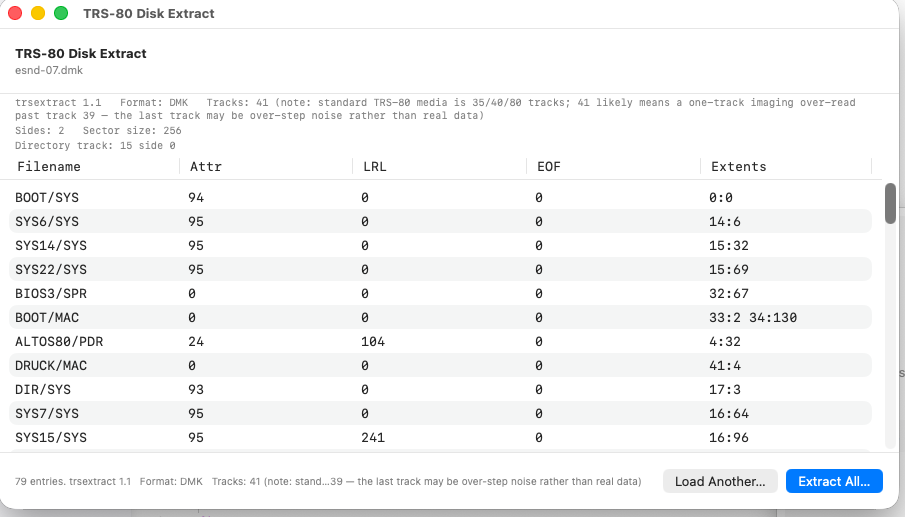
A native, dependency-free reader and extractor for TRS-80 Model I NEWDOS/80 and G-DOS floppy disk images (.dmk, .dsk). Lists directories and extracts files byte-for-byte, with no emulator, no Windows, and no external tools required — just Python 3.
Built for the preservation of an original TRS-80 Model I disk collection, and validated against authoritative TRSTools extractions across multiple disk geometries.
This repository also includes an optional SwiftUI wrapper that gives the tool a native drag-and-drop macOS interface (see the end of this README).
It can be found at https://github.com/Egbert-Azure/trsextract
Virtual Disk Kit-80 v1.6
Intended to allow one to perform a series of operations (read, write, rename, delete etc.) on files stored in a TRS-80 virtual disk image.
- Supports all known TRS-80 model I/III/4 Operating Systems, except CP/M
- Display the directory of files from the disks
- Extract files from the disks
- Add new files to the disks
- Rename existing disk files
- Delete files
- Show the contents of a file (Hex/ASCII dump)
- Show the contents of an entire disk (Hex/ASCII dump)
Note: Requires "libgcc_s_dw2-1.dll" (not included)
Commands:
-l - List directory (default)
-r - Read files
-w - Write files
-n - Rename files
-k - Delete files
-f - Dump file contents
-d - Dump disk contents
Virtual Floppy Disk Manager v1.7
Name:
Virtual Floppy Disk Manager v1.7
This is a small utility which allows you to access virtual TRS-80 DSK/DMK images at a file level, as if they were normal PC disks. A virtual TRS-80 disk is actually a PC file encoded with information extracted from a real TRS-80 floppy, in order to preserve its content and also to enable its use with TRS-80 emulators.
The TRS-80 Virtual Disk Manager shows the file name, size, date and attributes of each directory item, supports reading both .DSK and .DMK image files, and allows exporting TRS-80 files to the Windows file system.
Only read support is implemented.
VREAD and VWRITE
Site:
http://www.vavasour.ca/jeff/trs80.html#model1
VREAD and VWRITE were the first DSK import/export utilities, packaged by Jeff Vavasour with his Model I emulator. These utilities cannot process only single density DSK files.
Emulator File Read and Copy
This program reads DSK files, and displays the disk filenames in a list box. Clicking on a file, allows the file to be saved to a PC folder. It can be used just to view the Files on a DSK/DMK, if you dont want to copy the files.
It doesn't always work, but it has definitely helped me extract files from DSK images which the emulator would not recognize.
X/CMD
Name:
X/CMD for David Keil's Emulator
Transfer utility for David Keil's emulator between the emulator and DOS




-(phil-ereaut).jpg)